SEO Health
––
0–100 · not yet measured
Website Development · Custom Applications · Automation
An outdated website hidden from AI and SEO. Repeating processes primed for automation? A shared spreadsheet and broken processes become a custom application.
Let's build for what your business needs NOW.
01 / Website Development
Give customers the details they came for: your products or services, where you work, what others are saying and how to reach you. Make it easy to understand and gain exposure.
Explore websites02 / Custom Applications
Customer records, quotes, requests, dispatch, financials, document management and project updates in a single custom tool your team can use together.
Explore applications03 / Automation
Missing documents, payment reminders, tasks? A request or approval waiting for review. Set the degree of automation, stipulate the rules for what is performed automatically and what needs your approval. You maintain control.
Explore automationTwo scores. About a minute. No email or signup. Check your website right here.
––
0–100 · not yet measured
––
0–100 · not yet measured
Give customers the details they came for: your products or services, where you work, what others are saying and how to reach you. Make it easy to understand and gain exposure.
Explore website developmentCustomer records, quotes, requests, dispatch, financials, document management and project updates in a single custom tool your team can use together.
Four days since the signed agreement went out. Draft a follow-up to the client listing the outstanding items and a deadline.
Missing documents, payment reminders, tasks? A request or approval waiting for review. Set the degree of automation, stipulate the rules for what is performed automatically and what needs your approval. You maintain control.

Built for the office work behind the work
A phone that keeps ringing, an inbox that keeps filling, a commitment that has to go out this morning. We build websites, applications and automation around that, not the other way round.
Example workflow
A prospective client asks for help. Here's how a website, an application and an automation could carry that request from the first message to a reply your team has checked.
The inquiry form asks about the work, so the office has something useful to work with.
“We've outgrown the setup we started with and want someone to review our filings before the quarter closes.”
A specific request, ready for review.
The request becomes a shared record, with an owner and the missing information in view.
Confirm entity type and which filings are in scope before quoting. Pricing follows the intake call.
The handoff stays with the record.
The next message is drafted from the record. A person checks it before anything is sent.
“Thanks for reaching out about the compliance review. To scope this properly we'll need a short intake call. Could you confirm your entity type and which filings you'd like reviewed, along with a couple of times that suit you this week?”
Prepared automatically. Sent with approval.
Example workflow. Your project defines the fields, the connections, and which steps wait for approval.
Tell us where the handoff gets stuck
One request
A form, an email, a voicemail someone wrote down. What happens to it next is the difference between a business that runs and a business that remembers.
Automation demonstrations
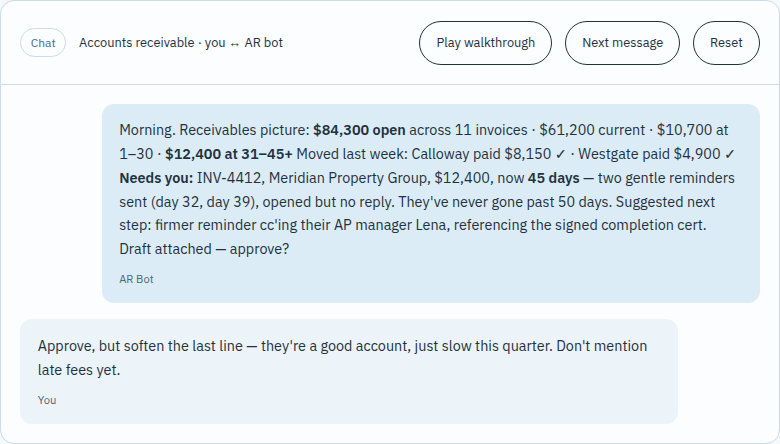
The reminder is ready. You know the customer. Change the tone, check the details, then decide what goes out.
Open this sample to follow the exchange, one message at a time.
You know the trade, the customers, and the way the office actually runs. We start there: with the request that gets lost, the record that gets copied, or the task that comes back to you.
Bring the form, spreadsheet, inbox, or repeated task. Explain where people have to work around it.
Agree the pages or screens, the connections, the price, and what you will review before launch.
Try the tasks your team will rely on. Check the awkward cases as well as the easy ones.
Set up access, handover, training, and the support your project needs after launch.
Starting from
$1,500
one-time build
Three packages, with the scope clearly defined.
Discuss your websiteStarting from
$1,999
per project
Subject to specifics of the project.
Discuss an applicationStarting from
$499
/ month per bot
Standard and heavy workflows, with volume discounts.
Discuss automationNo. Each service stands on its own. We only connect them when your workflow calls for it.
We start by reviewing your existing tools and data access. Connections are agreed and tested as part of the scope.
We focus on Arizona and California and deliver remotely. See our service areas, or ask about your location.
Tell us what happens today and where it gets stuck. Choose “I’m not sure yet” on the inquiry form.
Let’s talk about the work
Show us the spreadsheet, the website, or the task you keep explaining. That’s enough to start a useful conversation.
Start a project